

Mobile App UI/UX Design Best Practices for Higher Engagement
Mobile Apps | By Daisy Brown | 06-10-2025
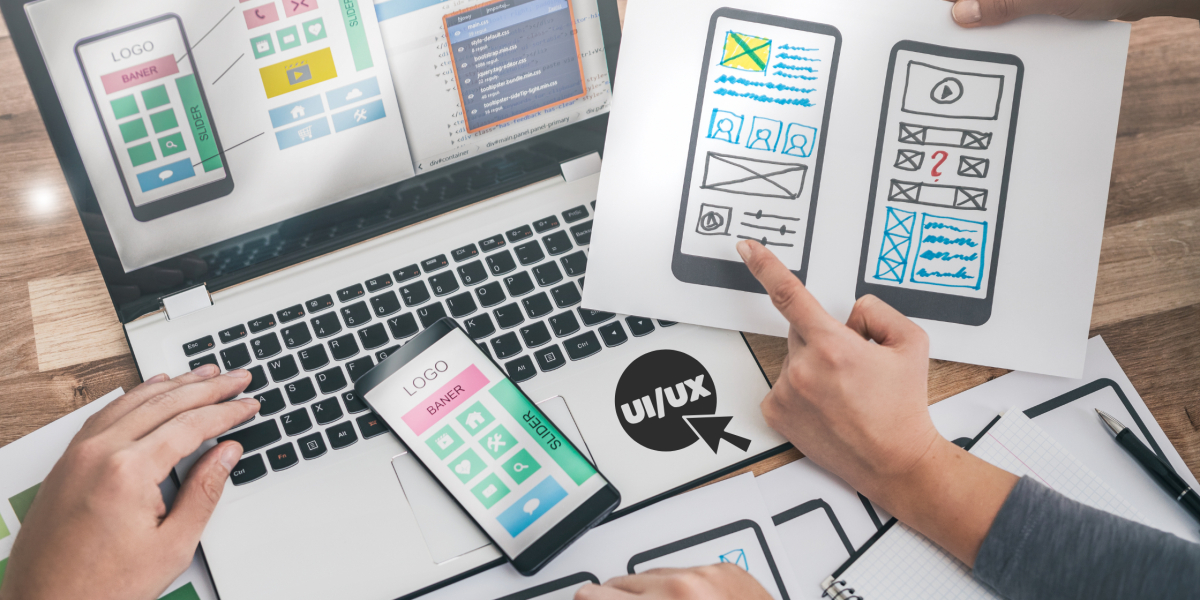
App performance is indeed intertwined with aspects like a platform’s look, feel, and functionality today. This being said, UI/UX design is more than just a sleek and minimalistic layout for an application. It impacts user experience and their engagement with the various features of the app.
Considering user interactions with brands on virtual platforms, modern-day customers desire value-driven products to be delivered at their doorstep. So, they connect with companies via apps to purchase what they need. Here, an appealing mobile app UI/UX design can assist companies in delivering a simple and navigational app experience while enhancing engagement. It will also help improve your app performance in the market.
This is why businesses and developer teams must focus on incorporating the UI/UX best practices to ensure their apps not only attract users but also keep them coming back. Keeping that in mind, we’ll explore some of the promising UI/UX design practices that drive engagement for an application.
Understanding Mobile User Behavior
When studying user behavior patterns to analyze a mobile app's performance, business leaders must give considerable importance to the fundamental concepts of user acquisition, engagement, and retention.
Let’s understand these three key terms:
- User Acquisition: This accounts for the ratio of new users who download or sign up for an application.
- User Engagement: This metric studies factors like user time spent, features used, and a digital record of their pages visited.
- User Retention: Retention tracks the number of existing users who have visited the app over a period of time.
So at its core, a simple and navigational UX design for mobile apps helps companies boost these metrics, while a poor and confusing design drives users away.
Mobile App UI/UX Design Strategies To Drive Higher Engagement
In the digital age, corporate leaders position UI/UX design as their top priority. These offer multifaceted benefits for the businesses. Making the app more user-friendly and accessible, the design enhances engagement on the platforms.
With this viewpoint, businesses can look forward to incorporating the following best practices to deliver an impressive UI design for mobile apps.
1. Simple and Intuitive Navigation
Consider this notion: Have you had an experience where you deleted an app within minutes of downloading it? This is what practically happens if the mobile app has a confusing or poor UI/UX design. Hence, seamless navigation is the cornerstone of strengthening a company’s digital footprint for an app. At its core, it incorporates the following aspects,
- Minimal design
- Simple functionality and everything accessible in a couple of clicks
- Consistent layout on all app pages
- Clear descriptive icons and text, so that users can easily find what they are looking for.
As anything too overwhelming or confusing will be avoided by the customers, a simple and intuitive design helps users navigate through the app easily. As a result, this helps boost user engagement and retention, supporting the brand’s sales and conversions.
2. Consistency in Design Elements
This is one of the key mobile app features that focuses on creating a seamless and uniform app UI design, where customers come back for more value each time. Primarily, it focuses on the following design elements, offering a multitude of benefits as follows:
- Consistency in design elements boosts visual (icons, color, layout, fonts) and functional familiarity (navigation patterns).
- This helps in enhancing brand recognition and app usability among the users.
- Another benefit this practice offers is that it reduces the cognitive load of the users (tasks can be done without any mental energy).
- Moreover, it augments the level of customer trust and reliance on the brand.
3. Responsive and Adaptive Layouts
So, why would a user prefer a responsive app? Brands often contemplate this thought to improve their app layout and design.
Contributing to this case, some factors like responsiveness and adaptability come into focus, where web designers can help organizations deliver consistent experiences to the users. These are explained as follows:
- Responsiveness: This feature enables the app to detect the screen resolution and adjust its layout accordingly. Additionally, it offers higher flexibility and is more search engine-friendly for the users.
- Adaptiveness: It facilitates the application to monitor screen sizes and adapt accordingly, based on variations in different user devices and platforms. This also enables revamping an app to make it more mobile-friendly.
- Consistency in layout: Thus, both these aspects focus on uniformity and help companies in setting the tone for a smooth user experience.
4. Visual Hierarchy and Readability
Another factor to improve an app’s user engagement can be through refining the content to be precise and breathable (a refreshing tone and layout setting). In real industry cases, this can be done in the following ways:
- Creating a visual hierarchy: It's a creative element that plays with color contrast, saturation, and font to grasp user attention.
- Scale in focus: This aspect focuses on content layout. Placement can be done through including heading, subheading, and body text, while highlighting the most important text through a bigger font size.
- Grouping: It helps bring the focus on app content and key features by grouping text, ads, and navigation features on the platform.
- Spacing: This is an important aspect that allows designers to create an interface that looks more readable and skimmable.
5. Fast Loading Speed and Performance
Business leaders understand that today’s users have a shorter attention span. This fact emphasizes the need for fast-paced searches and speedier app performance for your target audience.
It is an essential consideration for brands because an app with a slow loading time leads to frustrated and dissatisfied users. On the contrary, quicker app loading gives the perception of a more responsive interface, assuring higher user engagement.
So, on technical grounds, designers can incorporate the following two aspects to optimize loading speed,
- Reducing image size.
- Storing browser cache can also facilitate a faster loading time.
Hence, with these specific mobile app design tips, faster loading time and stronger app performance can be achieved.
6. Personalization and Customization
Personalization has become a commonly used term these days in the gamut of app development and design. In fact, it is an important part of UI/UX design for mobile apps, helping designers in creating an app interface that is more user-centric.
There is a minute differentiation between the two. While personalization is system-controlled, customization allows the user to take charge and choose which app features they want to explore. An example of personalization can be a food app offering discounts based on location-specific food joints, while customization enables the usage of dark/light mode based on user preference.
Although both of them are different, they offer three main benefits to companies (considering how this practice can help organizations in gaining higher engagement).
- It helps keep customers coming back for more value.
- By making users feel valued, it also boosts retention.
- Finally, these aspects increase conversion as well.
7. Accessibility and Inclusivity
It is important to note that accessibility and inclusivity are among the important mobile app design tips that have the power to enhance a brand’s reach among the following groups:
- Differently abled people
- Older people,
- Groups belonging to other cultures, languages, and demographics.
Technically, this is important as it also helps companies comply with legal norms.
So, while designing apps for a wider user group, companies must consider the following:
- For visual, hearing, motor, or cognitive difficulties, designers can provide screen reader support, text-to-speech options, large font, and spacing (for motor-related issues).
- For ensuring inclusivity, multiple language support can be provided along with neutral icons and imagery (keeping in mind different cultures and demographics).
Conclusion
Planning with a forward-looking approach, leaders can implement these mobile-first strategies for delivering a frictionless and inclusive app experience to users.
Eventually, these practices may need to be fine-tuned to meet the evolving needs of users. Yet, the principle remains the same: keep the app user-centric to gain higher engagement and retention.
Keeping that in mind, we can conclude that prioritizing UI and UX design for mobile apps isn’t just a design choice. Rather, it’s a strategic investment that drives higher engagement through revamping your app interface.

Daisy Brown
| AuthorDaisy is a technological enthusiast and content writer exploring the growing segment of mobile UI/UX design best practices for companies. With specialized knowledge, she assists decision makers in exploring these practices for gaining a higher engagement with the users.
Recent Blogs
.jpg "Benefits of Order Tracking Apps for E-Commerce")
Benefits of Order Tracking Apps for E-Commerce
Mobile Apps | 24-09-2026
.jpg "10 Ways Salesforce SMS Improves Customer Engagement")
10 Ways Salesforce SMS Improves Customer Engagement
Salesforce | 23-09-2026
.jpg "How Full Stack Development Supports Scalable Enterprise Apps")
How Full Stack Development Supports Scalable Enterprise Apps
Mobile Apps | 22-09-2026
.jpg "Seedance 2.5 vs Higgsfield for App Launch Videos")
Seedance 2.5 vs Higgsfield for App Launch Videos
Technology | 14-09-2026



